Multiple Chart "Tabs" - Make separate
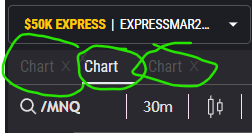
As with the other instruments, you can have multiple tabs of the DOM, TnS, Order Book... And they are all separate. Now from what I can gather playing around with it, you are also able to have multiple chart "tabs" side by side - but this serves no purpose... on one tab you will link a different instrument, only to flick over to the next chart tab and have it refresh to the exact same - E.G. Changes you made on one tab reflect on all other tabs like clones ...
Solution: Similar to Ninja trader, have the chart tabs completely separate from each other, whether they be different instruments or different time frames to cycle between - also changing between the chart and the chart that you click on (if you have 2 or more open with in a "tab") changes the order book for seamless execution to avoid mechanical errors (like I and many others have no doubt).
This request was merged into another request
Comments5
Rodrigo
Jan 23, 2025
BUMP in relation to quick linking changing the orderbook by clicking which chart you have open (like trading view)
“also changing between the chart and the chart that you click on (if you have 2 or more open with in a "tab") changes the order book for seamless execution to avoid mechanical errors (like I and many others have no doubt).”
Sippin' Goose
Aug 7, 2024
how did you manage to add more chart tabs? It doesnt give me the option to add it through Add Component
Rodrigo
Sep 18, 2024
They must have removed them them recently. I still think it is a great idea to have chart tabs to flick through!
mrkrrtft
Jun 5, 2024
As it looks I actually expected this behavior. I wanted to have a tab for NQ, ES, Gold, Crude, etc. This would be great.
Rodrigo
Sep 18, 2024
I agree, I don’t know why they haven’t. It also appears they have removed Chart from the “Add component” section. Imagine having all your charts up ready to go, easy to flick through, all linked to their relative colors that was able to change the order ticket with just a click on to the chart in question…