Improvements to Chart Executions
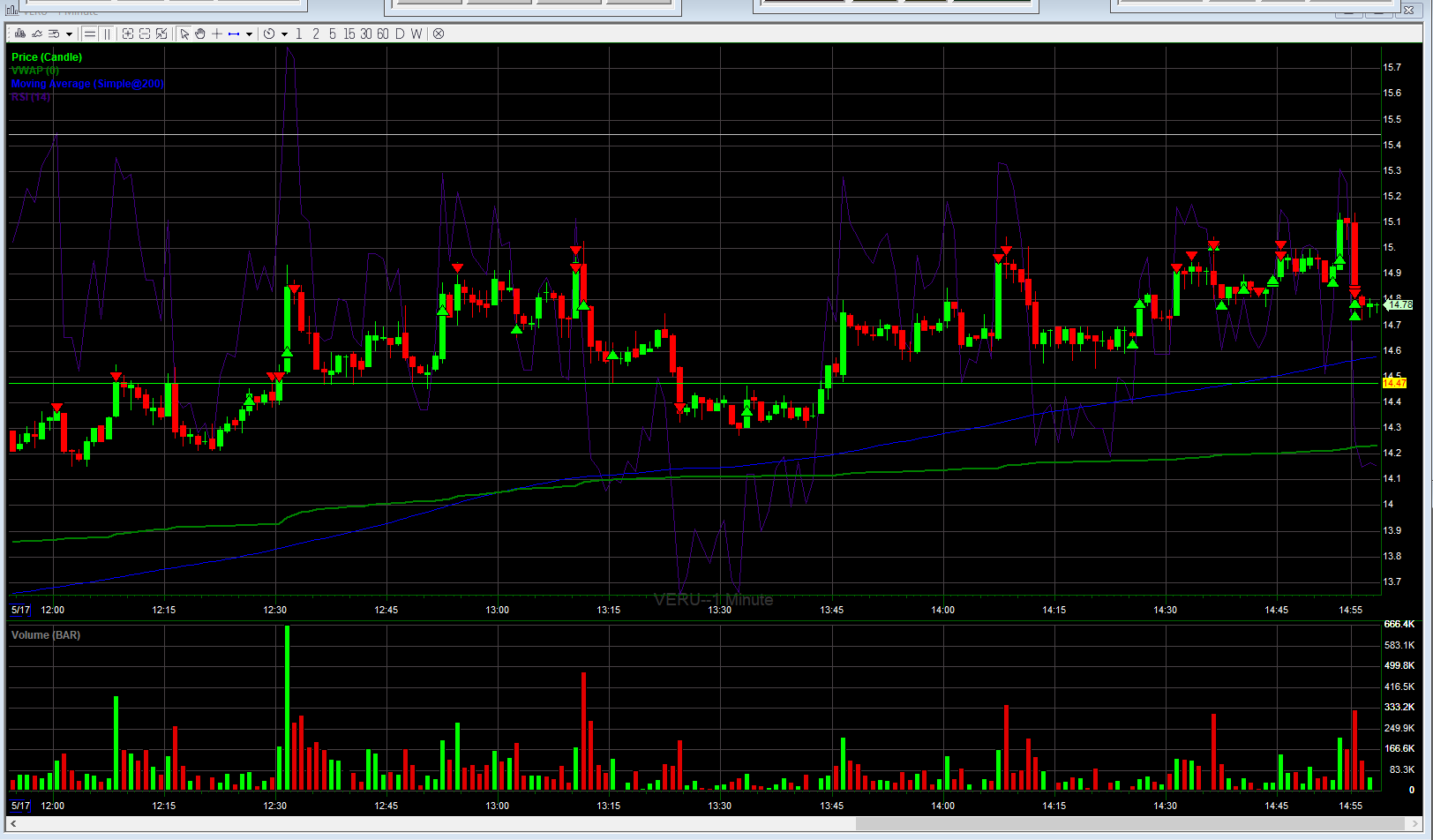
I would love to see trade executions shown on chart similar to DAS or other trading platforms, using red and green triangles at the exact trade location. This would speed up the review process at the end of the day. If you make a lot of trades during the session with the current layout the chart executions begin to be unreadable and overlapping. It takes a while to determine where exactly you entered and exited on the candles. This platform is one of the best I have used. Thanks for all the hard work!! Example below of DAS executions.
This request was merged into another request
Comments19
richardw
Jun 12, 2024
This is such a critical feature. I am grateful that we now have the option to show our trade executions on the charts, but displaying the entire price clutters the chart and makes it hard to see. Also, without specific pointers that show where on the candle the execution occurred, it is still extremely difficult to use with any benefit. We need to be able to see where on the candles the trade executed without the price blocking or cluttering the view. I often scale into trades and need to be able to see where my executions occurred to assist me as I continue to manage the trade.
richardw
Jun 12, 2024
NinjaTrader does this well. This is extremely critical for me, also, as I often scale into and out of trades. It is also extremely beneficial for reviewing my trades later.
Kevin Leehan
May 9, 2024
This feature is already requested, please upvote this request to get the feature more attention.
"Show trade executions on chart"
Gabriel Rosales
May 30, 2024
Here's an example of how intrusive and clogged up the chart executions look now. It would be great to see the arrows as in Tradovate! This chart shows only executions on two trading days!
mauricio castro
Jun 6, 2024
I second this, sometimes when there are executions close together the text is overlapped and is not really useful, someway to turn off the text and only show the arrows would be awesome
Michael Stanton
Jul 9, 2024
We need the ability to have an arrow on the side of the candle pointing to the exact entry and exit price on the candle as opposed to an arrow above/below candle. Having execution price above/below the candle clutters the chart. An arrow pointing to the price is easier to see. We should also be able to connect the arrows with a green line showing profitable trades and a red line showing losing trades. This is critical for end of day trade review.
Daniil
Aug 24, 2024
This, I NEED THIS! Looking at all those prices and checking the time i bought them is so tough. Exact pinpoint price entry and exit is something that would 100% speed up my daily reviews.
almo cattani
Jul 1, 2024
have the option to turn off text and only show plot points
SKim
Mar 7, 2025
Second this.
Michael Stanton
Jul 9, 2024
I agree, we need arrows on the side of the candle pointing to the exact entry/exit price, and the ability to have a line connecting them showing a profit or loss.
SKim
Mar 7, 2025
I second this. Especially the *option* to turn off/on lines connecting opening orders to closing orders for positions.
EDIT: the attached example image is from Sierra Charts.
EDIT 2: bonus points if the line colors can be user-selected to indicate profit or loss. (also in sierra charts but not shown in the example image)
danilo055
Jul 17, 2024
CORRECTION:
The current "show chart execution" feature could be improved by replacing the arrows with circles placed precisely at the price points within the candles. This would enhance visibility on every timeframe, allowing users to see the exact entry and exit points and removing cluter. Additionally, providing an option to toggle the display of the price number or not will be great because this just creates even more clutter