Charting Enhancement [Object Tree][RTH]
There are some essential features missing from Tradingview
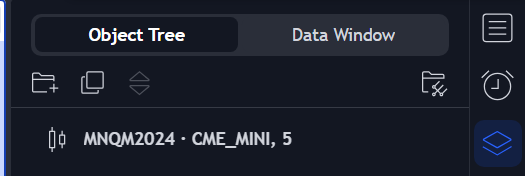
Object Tree and Data Window - Quite important to organize the objects on the charts as well as reorder the items as some items must display above the others
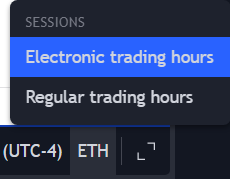
RTH/ETH switch - This one seems like a basic functionality which is missing from the charts to see where the RTH gaps are.
Log in to comment and vote
Comments10
Heaben D Rainers
May 1, 2024
This is feature I use on a daily basis, this would be nice to have
Deric Shonuga
Mar 18, 2024
I already got this request in! Good to know it's important to others too!
AfterLifeTrading
Mar 29, 2024
After using TopstepX for a couple weeks, I find charting enhancements less and less important. There are just too many limitations using TopstepX as my main charting software. And as I am trading multiple accounts across multiple prop firms, I find it easier to chart on my Tradingview and put my orders in the order entry tools when I am ready to enter a trade.
Fedna Paul
May 13
•Merged request
•1 vote
RTH/ETH toggle for charts
The gaps that i am seeing my candlestick charts are due to my chart being set to Regular Trading Hours (RTH) mode. I am unable to view overnight session data, (which is current) .
rickey mcglone
May 13
•Merged request
•1 vote
Can get shading in the charts that shows extended hours action from RTH trade. this is very important. RTH data is far more critical than ETH trade. thanks
rickey mcglone
May 13
•Merged request
•1 vote
Can get shading in the charts that shows extended hours action from RTH trade. this is very important. RTH data is far more critical than ETH trade. thanks
Liam Bushay
Jul 15
•Merged request
•3 votes
Add object tree
Jacques Canac-Marquis
Jun 5
•Merged request
•1 vote
Please add an “apply” button when the “Object Tree” menu is open, so that we don't have to reopen the menu every time we want to make a change. Currently, as soon as we click “OK,” the menu disappears.