Right-Click: Customize Market and Limit Order Placement
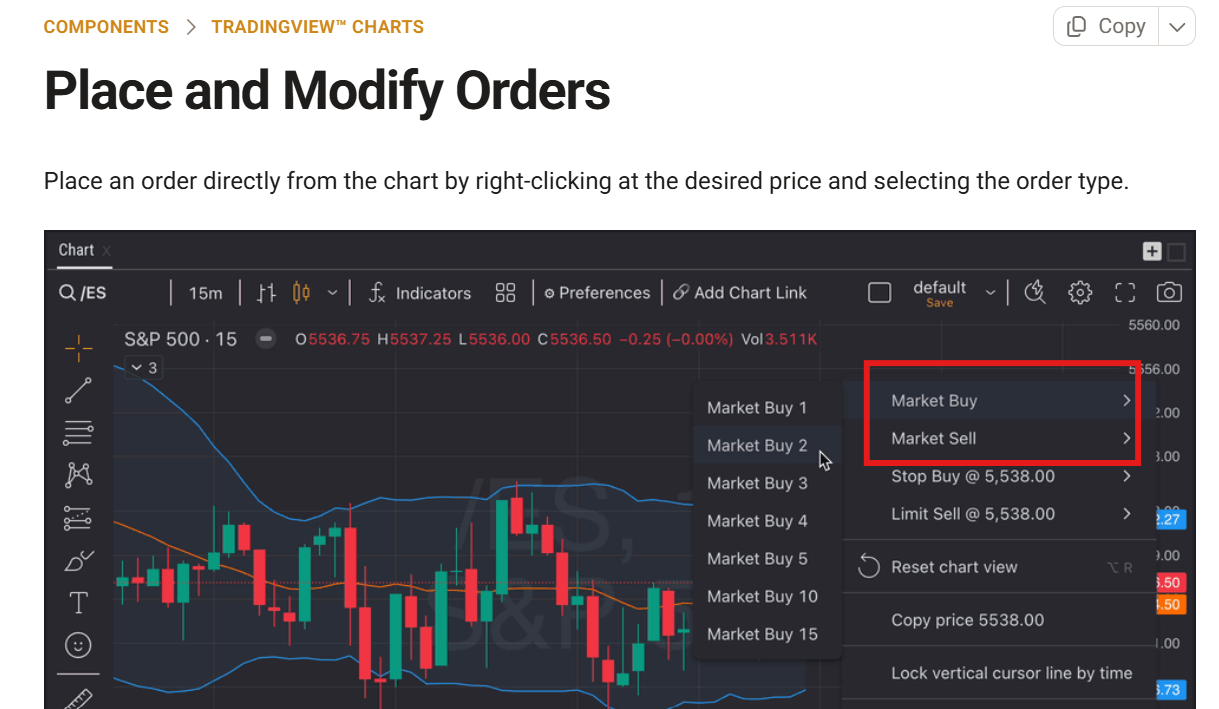
In the Chart Component, I would like to be able to customize the list from the order placement. Currently, it has Market Buy, Market Sell, Stop Buy @ and Limit buy/sell. I would like to be able to have my Limit buy/sell order placement on top of the list when I right click. May you be able to create a “Custom Click” Order placement setting?
Log in to comment and vote
Comments11
Trader G
May 8
•Merged request
•4 votes
Customize right click menu context items
The right click to set a limit orders is okay, it's not ideal since it's mixed with market order. I want an option to remove market orders from that menu since I can market order in via the DOM or TS -- or even JUST change to text color or background in that chart menu for market buy to green and sell to red and leave limit orders grey as is would be a HUGH improvement and provide an obvious visual clue. It's a common annoyance and I have entered erroneously and exited erroneously with this current setup.
jamie1baker
Aug 2, 2024
PLEASE, PLEASE, PLEASE add the ability to customize this right-click menu. With all the choices between Market, Limit and Stop, it is painful to try making a quick selection while still watching price. As mentioned in the OP, I only use one of these- Stop, in my personal case. I have been stopped out numerous times by inadvertently selecting the wrong option by trying to rummage through the choices while still watching price. I love that with a click I can set an order at a specified price- that is beautiful- but I’d love to pare down the menu to only show what I use. Thank you.
Raphael Vigneault Ð.
Dec 30, 2025
UP
Raphael Vigneault Ð.
May 13
•Merged request
•1 vote
Right Click | Contextual Menu | Market Buy/Sell
Please remove the buy/sell at market from right click contextual menu it only breaks ongoing trades. On chart option should only propose Sell Limit an buy stop…..
Brian Webber
May 13
•Merged request
•1 vote
change contract amounts using limit sell or stop buy indicators on chart
Brian Webber
Mar 26
in Sierra Charts, I can change the contract amount of a live trade on the screen allowing the trader to keep eyes on the trade at all times and manage risk faster
ABE
Jun 2
•Merged request
•2 votes
One-Click Custom Orders
A "Custom Orders" feature to instantly place your pre-set trade plan when you click "Long" or "Short."
What It Does: Save your strategy (take profits, stop loss, trailing stop, optional daily limit) and apply it automatically with one click for any trade.
Features:
Multiple take profits (e.g., TP1: 10 pts, 50%; TP2: 20 pts, 50%).
Fixed stop loss (e.g., 10 pts) locked to prevent errors.
Auto break-even after TP1; optional trailing stop (e.g., 5 pts).
Optional one-trade-per-strategy-per-day limit to curb overtrading (toggle on/off).
TP/SL levels displayed on TradingView charts before execution.
Save and reuse setups for one-click execution.
Why Traders Will Love It:
Fast: Scalping ES or NQ? Click, and your trade’s fully set.
Disciplined: Locked stops and optional trade limits keep you on track.
Profitable: Break-even and trailing stops protect gains.
Simple: No manual tweaks—your strategy’s ready to go.
Why It’s a Win: Makes TopstepX faster and smarter, helping you crush the Combine and excel in funded accounts with pro-level precision.
MattP
Dec 2, 2025
I’m very surprised ‘one click order entry’ is not available on the chart…. this execution feature is essential for serious Traders looking to capitalize on fast moving markets.
This must be implemented on the chart.
The order entry mechanism needs to dynamically recognise the following.
When above current price, using dynamic horizontal line at desired price:
Left click to drop the order will be a limit sell order
Right click will be market stop buy order
When below current price, using dynamic horizontal line at desired price:
Left click to drop the order will be a limit buy order
Right click will be market stop sell order
As mentioned by the original poster the order entry defaults such as quantity, stop and target should be taken from the existing default locations for a day 1 delivery. Further release for % based targets and/or stop placements should be considered for day 2 delivery to not delay the core execution feature we are eluding to.
Erickson Jaquez
Jun 5
•Merged request
•2 votes
Custom Right-Click Limit Order
It would be great if we could change/customize the number of contracts when right-clicking for limit orders.
Timothymailloux0425
Jun 10
•Merged request
•1 vote
I would like to be able to remove market order tab when you rt click the chart
Paulo
Jul 27
•Merged request
•1 vote
Market Buy and Sell Orders right click menu
Please can these be removed or can we have the option to remove them? The amount of times i’ve accidentally clicked them when trying to create limit orders is too many and results in instant losses. I doubt anyone actually uses this menu to place market orders as it’s slow and clunky. Thanks